
Thiruvalluvar University Result 2026 Out – Check UG 6th Semester Results at tvu.edu.in
Loading contents...
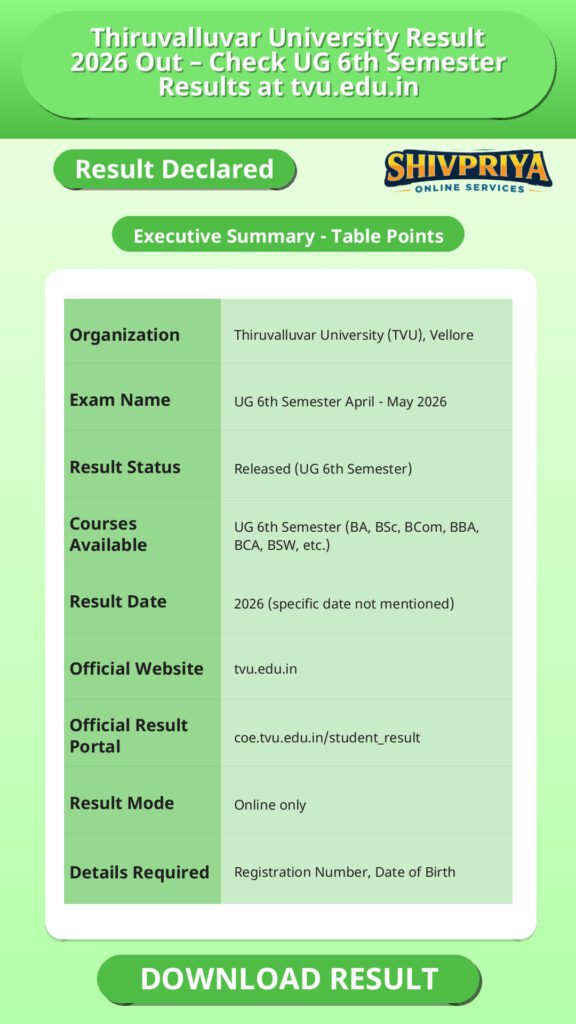
| Organization | Thiruvalluvar University (TVU), Vellore |
|---|---|
| Exam Name | UG 6th Semester April – May 2026 |
| Result Status | Released (UG 6th Semester) |
| Courses Available | UG 6th Semester (BA, BSc, BCom, BBA, BCA, BSW, etc.) |
| Result Date | 2026 (specific date not mentioned) |
| Official Website | tvu.edu.in |
| Official Result Portal | coe.tvu.edu.in/student_result |
| Result Mode | Online only |
| Details Required | Registration Number, Date of Birth |
How To Check Result Online
इस सेक्शन में आप जानेंगे कि कैसे आसानी से TVU के आधिकारिक पोर्टल पर जाकर अपना UG 6th Semester Result 2026 चेक किया जा सकता है।
- Visit the official result portal: Open your browser and go to coe.tvu.edu.in/student_result
- Select your course and semester: Choose the relevant program (e.g., UG 6th Semester) from the available options
- Enter your Registration Number: Type your registration number exactly as it appears on your hall ticket – any mismatch will result in an error
- Enter your Date of Birth: Input in DD/MM/YYYY format
- Complete the CAPTCHA: Enter the security code displayed on the screen
- Click “Get Result” or “Submit”: Your provisional result sheet will appear on screen
- Verify all details: Carefully check your name, roll number, subject-wise marks, and result status
- Download and save: Click Print or save as PDF for future reference until your original marksheet is issued by your college
Pro Tip: Use a desktop or laptop for faster page loading. If the portal is slow, clear your browser cache and try again after a few minutes. Avoid third-party websites – always use the official TVU COE portal.
Marksheet Details
यहाँ आप जानेंगे कि TVU के marksheet में कौन-कौन सी महत्वपूर्ण जानकारियाँ होती हैं जिन्हें चेक करना जरूरी है।
- Student Name and Photograph
- Registration Number / Roll Number
- Course Name and Semester
- Subject Names and Subject Codes
- Internal Assessment Marks
- End Semester Examination (ESE) Marks – Theory and Practical
- Total Marks Obtained
- Result Status – Pass / Fail / Withheld
- Grade or Division (where applicable)
If you notice any discrepancy in the above details, contact your college examination office or the Thiruvalluvar University examination department immediately with your supporting documents.
Grading System and Pass Criteria
Thiruvalluvar University के ग्रेडिंग सिस्टम और पास क्राइटेरिया को समझना छात्रों के लिए जरूरी है ताकि वे अपने मार्कशीट को सही तरीके से समझ सकें।
| Percentage Range | Division / Classification |
|---|---|
| 75% and above | First Class with Distinction |
| 60% – 74% | First Class |
| 50% – 59% | Second Class |
| 40% – 49% | Third Class (Pass) |
| Below 40% | Fail |
Note: Classification criteria may vary slightly depending on the specific program or batch regulations. Students should refer to their university regulations handbook or contact their college for program-specific grading norms.
Options After Failing
अगर आप परीक्षा में फेल हो जाते हैं, तो TVU द्वारा उपलब्ध कराई गई विभिन्न विकल्पों के बारे में जानकारी इस सेक्शन में दी गई है।
- Arrear Examinations: Students can appear for failed subjects in the next scheduled semester exam (arrear exams). Failing a subject does not cancel the entire academic year.
- Revaluation: If you believe your answer script was not evaluated fairly, you can apply for revaluation.
- Re-totalling: You can request a re-checking of your total marks without a full revaluation.
- Photocopy of Answer Scripts: Students can also apply for a photocopy of their evaluated answer booklet to review the marking.
Revaluation Process
रिवेल्यूएशन के लिए आवेदन कैसे करें और फीस कितनी है, इसकी पूरी जानकारी इस सेक्शन में दी गई है।
The revaluation application window typically remains open for 7 to 15 days from the date of result declaration. Applications can be submitted online through the official TVU/COE portal or through your affiliated college’s examination cell.
Revaluation Application Fees:
- UG Courses: ₹400 per paper
- PG Courses: ₹800 per paper
Steps to Apply for Revaluation:
- Visit tvu.edu.in or coe.tvu.edu.in
- Navigate to Examinations → Revaluation / Notifications section
- Click on the Revaluation Apply Online link for the April-May 2026 session
- Enter your registration number and date of birth
- Select the subject(s) you wish to apply for
- Pay the prescribed fee online
- Submit the form and download the confirmation receipt
If the online revaluation link is not yet active, contact your college examination cell to apply offline within the deadline.
Troubleshooting Result Issues
अगर आपको रिजल्ट चेक करने में दिक्कत आ रही है, तो इस सेक्शन में दिए गए सामान्य समाधान आपकी मदद कर सकते हैं।
- Result not found: Double-check that your registration number and date of birth are entered exactly as they appear on your hall ticket
- Page not loading: Clear your browser cache and cookies, then reload the portal
- Server too slow: The COE portal may experience heavy traffic immediately after result declaration – try again after a few hours or during off-peak times
- Wrong details on marksheet: Contact your college examination office with your hall ticket and ID proof for correction
- Technical issues persisting: Reach out directly to the Thiruvalluvar University examination department at tvu.edu.in
Frequently Asked Questions (FAQs)
यहाँ TVU Result 2026 से जुड़े आम सवालों के जवाब दिए गए हैं जो छात्रों को सहायता प्रदान करेंगे।
- Q1. Has Thiruvalluvar University Result 2026 been released?
- Yes. Thiruvalluvar University has released the April–May 2026 Semester Examination results for UG 6th Semester students. Results for other semesters and PG courses are expected to be published in upcoming batches on the official portal.
- Q2. Where can I check Thiruvalluvar University Result 2026?
- You can check your TVU result at the official COE student result portal: coe.tvu.edu.in/student_result. You will need your registration number and date of birth to log in.
- Q3. Which semester results are currently available for TVU April–May 2026?
- As of now, results have been released for UG 6th Semester only. Other semester results (1st, 2nd, 3rd, 4th, 5th) and PG results for the April–May 2026 session are expected to follow.
- Q4. What details do I need to check my Thiruvalluvar University result?
- You need your Registration Number (exactly as on your hall ticket) and your Date of Birth in DD/MM/YYYY format to access the TVU result portal.
- Q5. Can I check Thiruvalluvar University result on my mobile phone?
- Yes. The official COE result portal (coe.tvu.edu.in/student_result) is accessible on mobile browsers. However, for a smoother experience, using a desktop or laptop is recommended.
Next Stage Guidance
अगर आपने UG 6th Semester Result चेक कर लिया है और सफल हो गए हैं, तो आगे की पढ़ाई या करियर के लिए जरूरी कदम उठाना शुरू करें।
- अगले सेमेस्टर के लिए समय पर रजिस्ट्रेशन करें।
- अपने मार्कशीट की हार्ड कॉपी अपने कॉलेज से प्राप्त करें।
- अगर किसी विषय में फेल हुए हैं, तो आगे की Arrear Exams की तैयारी शुरू करें।
- रिवेल्यूएशन का विकल्प चुनने पर निर्धारित समय में आवेदन करें।
Document Verification Tips
Document Verification के समय ध्यान में रखने योग्य महत्वपूर्ण बातें ताकि कोई समस्या न हो।
- अपनी सभी शैक्षणिक और पहचान संबंधी दस्तावेज़ तैयार रखें।
- मार्कशीट, एडमिट कार्ड, पहचान पत्र आदि की फोटोकॉपी साथ ले जाएं।
- किसी भी असंगति के लिए जल्दी से कॉलेज परीक्षा विभाग से संपर्क करें।
- Document Verification की तारीख और समय का ध्यान रखें और समय से पहुंचें।
Common Result Mistakes
Result चेक करते समय होने वाली सामान्य गलतियों से बचने के लिए कुछ सुझाव।
- रजिस्ट्रेशन नंबर गलत टाइप न करें।
- जन्मतिथि सही फॉर्मेट (DD/MM/YYYY) में डालें।
- फर्ज़ी वेबसाइट से रिजल्ट न देखें, केवल आधिकारिक पोर्टल का उपयोग करें।
- मार्कशीट डाउनलोड करने के बाद सभी डिटेल्स ध्यान से चेक करें।
- किसी भी समस्या के लिए तुरंत संबंधित विभाग से संपर्क करें।
“`
Related Categories
Disclaimer
Yeh job post sirf informational purpose ke liye banayi gayi hai taaki aapko recruitment ki details simple aur samajhne layak format me mil sake.
Time ke saath details me changes ho sakte hain (jaise dates, vacancies, eligibility, etc.). Isliye apply karne se pehle official notification ko zarur verify karein.
Hum kisi bhi typing error, outdated information ya misunderstanding ke liye zimmedar nahi honge.